

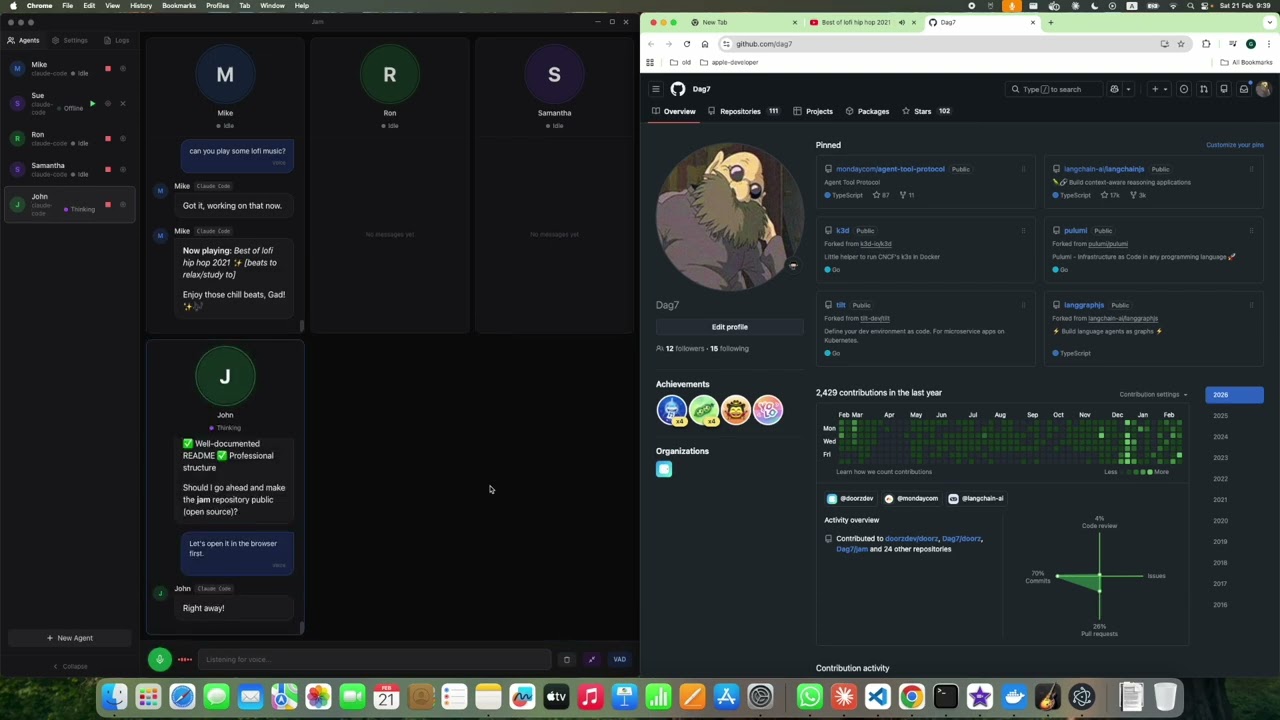
Autonomous AI Agent Orchestrator — build, run, and coordinate a team of autonomous coding agents from your desktop with voice control.



git clone https://github.com/Dag7/jam.git
cd jam
./scripts/setup.sh
yarn dev
The setup script handles everything: Node version, Yarn 4 via Corepack, dependencies, and verification. Just clone and run.
Requires: Node.js >= 22 (the script will install it via nvm/fnm if needed)
Pre-built binaries — no setup needed:
| Platform | Download |
|---|---|
| macOS | Jam.dmg |
| Windows | Jam-Setup.exe |
| Linux | Jam.AppImage |
macOS builds are signed and notarized with Apple Developer ID — no Gatekeeper warnings.
Jam is an autonomous agent orchestration system. It lets you spin up a team of AI coding agents that work independently — each with its own terminal, personality, voice, memory, and workspace. Agents execute tasks autonomously, learn from their interactions, evolve their personalities over time, and coordinate with each other. You interact through text or voice; Jam handles the routing, context, and lifecycle.
- Autonomous agent orchestration — Agents work independently with their own PTY, memory, and evolving personality
- Voice control — Talk to your agents hands-free with STT/TTS (Whisper + ElevenLabs/OpenAI)
- 4 agent runtimes — Claude Code, Cursor, OpenCode, and Codex CLI as backends
- Living personalities — Each agent has a SOUL.md that evolves over time
- Conversation memory — Agents remember past conversations across sessions via JSONL history
- Dynamic skills — Agents auto-generate reusable skill files from learned patterns
- Chat + Stage views — Unified chat or per-agent terminal view
- Per-agent voices — Assign unique TTS voices (61 total across OpenAI + ElevenLabs)
- Command routing — Voice commands routed to the right agent by name
- Virtual computer — Each agent can get its own virtual desktop with browser, mouse, and keyboard
- Computer use — Agents interact with GUIs via screenshot, click, type, scroll, and Playwright browser automation
- Sandbox isolation — Docker containers or OS-level sandboxing (Seatbelt/Bubblewrap)
- Git worktree isolation — Each agent can work on its own branch
- Team coordination — Task scheduling, smart assignment, trust scoring
- Auto-update — Built-in update mechanism via GitHub Releases

The system is a Yarn 4 monorepo with 10 packages:
| Package | Description |
|---|---|
@jam/core |
Domain models, port interfaces, event definitions |
@jam/eventbus |
In-process pub/sub EventBus (22 events) with diagnostics |
@jam/agent-runtime |
PTY management, agent lifecycle, 4 runtime implementations |
@jam/voice |
STT/TTS providers, command parser, voice service |
@jam/memory |
File-based agent memory with session persistence |
@jam/team |
Task scheduling, smart assignment, soul evolution, communication |
@jam/sandbox |
Docker containerization, seccomp, port allocation, audit logging |
@jam/os-sandbox |
OS-level sandboxing (Seatbelt/Bubblewrap), git worktree management |
@jam/computer-use |
Virtual desktop (Xvfb), screenshot, input simulation, Playwright browser automation, REST API |
@jam/desktop |
Electron + React desktop app |

All runtimes extend BaseAgentRuntime using the Template Method pattern:
| Runtime | CLI | Output | Input | Session Resume |
|---|---|---|---|---|
| Claude Code | claude |
JSONL | stdin | --resume <id> |
| Cursor | cursor-agent |
JSONL | stdin | — |
| OpenCode | opencode |
Raw stream | stdin | — |
| Codex CLI | codex |
Raw stream | CLI arg | — |
| Type | Provider | Options |
|---|---|---|
| STT | OpenAI Whisper | whisper-1, gpt-4o-transcribe, gpt-4o-mini-transcribe |
| STT | ElevenLabs | scribe_v1, scribe_v1_experimental |
| TTS | OpenAI | 13 voices, speed control |
| TTS | ElevenLabs | 48 voices, stability + similarity tuning |
| Tier | Method | Features |
|---|---|---|
| OS | Seatbelt (macOS) / Bubblewrap (Linux) | Domain whitelist, file deny lists, deny-write patterns |
| Docker | Container per agent | CPU/memory limits, seccomp, network policy, disk quota, audit log |
| Worktree | Git branch isolation | Auto-create worktrees, merge status tracking |
Each agent can be given its own virtual desktop — a full X11 display running inside a Docker container. When "Allow Computer Use" is enabled on an agent, Jam spins up a complete desktop stack:
┌─────────────────────────────────────────────┐
│  Docker Container                           │
│  ┌───────────────────────────────────────┐  │
│  │  Xvfb (Virtual Display :99)           │  │
│  │  1920×1080 · 24-bit color             │  │
│  ├───────────────────────────────────────┤  │
│  │  Fluxbox (Window Manager)             │  │
│  ├───────────────────────────────────────┤  │
│  │  Computer-Use API Server (:3100)      │  │
│  │  ├── Screenshot (scrot + ImageMagick) │  │
│  │  ├── Input (xdotool: click/type/key)  │  │
│  │  ├── Window mgmt (wmctrl)             │  │
│  │  └── Browser (Playwright + Chromium)  │  │
│  ├───────────────────────────────────────┤  │
│  │  x11vnc → noVNC (:6080)              │  │
│  │  (live view in Jam dashboard)         │  │
│  └───────────────────────────────────────┘  │
└─────────────────────────────────────────────┘
What agents can do with it:
| Capability | How | Details |
|---|---|---|
| See the screen | GET /screenshot |
PNG/JPEG capture, region support, base64 output |
| Click & scroll | POST /click, /scroll |
x/y coordinates, left/right/middle button, double-click |
| Type text | POST /type, /key |
Text input with delay, key combos (Ctrl+C, Alt+Tab, etc.) |
| Manage windows | GET /windows, POST /focus |
List, focus by title/ID, launch apps |
| Browse the web | POST /browser/launch |
Playwright-driven Chromium with full automation |
| Observe changes | GET /observe, POST /wait |
Composite status, poll for screen changes |
The noVNC viewer is embedded directly in the Jam dashboard, so you can watch your agent interact with GUIs in real time.

When you send a message: React UI captures input, invokes IPC to the main process, which parses the command, resolves the target agent, enqueues it, enriches context (SOUL.md + conversation history + skills), and executes via the agent's runtime. The response is recorded and returned to the UI.

Voice flows through: audio capture → STT transcription → command parsing & agent routing → agent execution → TTS response → audio playback. Progress phrases provide real-time voice feedback during execution.

Agents maintain context through three mechanisms:
- Session ID resume — Claude Code uses
--resumeto continue server-side conversations - Conversation JSONL — Daily log files, last 20 entries injected into system prompt (all runtimes)
- SOUL.md + Skills — Persistent personality and auto-matched skill files
For detailed architecture documentation, see docs/architecture.md.
- At least one agent runtime CLI installed: Claude Code, OpenCode, Codex CLI, or Cursor
- API keys for your preferred voice providers (optional, for voice features):
- OpenAI API key (for Whisper STT and/or OpenAI TTS)
- ElevenLabs API key (for ElevenLabs STT and/or TTS)
- Launch Jam
- Open Settings (gear icon in sidebar)
- Add your API keys for voice providers
- Create an agent — pick a name, runtime, model, and voice
Each agent gets a directory at ~/.jam/agents/<name>/:
~/.jam/agents/sue/
├── SOUL.md              # Living personality file
├── conversations/       # Daily JSONL conversation logs
│   └── 2026-04-04.jsonl
└── skills/              # Agent-created skill files
    └── react-patterns.md
- Node.js >= 22 (Vite 7 requires 22.12+)
- Yarn 4 (managed automatically via Corepack)
| Command | Description |
|---|---|
yarn dev |
Start desktop app in dev mode |
yarn build |
Build all packages |
yarn typecheck |
Type check all packages |
yarn test |
Run all tests |
yarn test:coverage |
Run tests with coverage |
packages/
  core/             # Domain models, port interfaces, events
  eventbus/         # In-process EventBus + HookRegistry
  agent-runtime/    # PTY management, agent lifecycle, runtimes
  voice/            # STT/TTS providers, command parser
  memory/           # File-based agent memory
  team/             # Task scheduling, soul evolution, communication
  sandbox/          # Docker containerization, seccomp
  os-sandbox/       # OS-level sandboxing, git worktrees
  computer-use/     # Virtual desktop, browser automation
  brain/            # Brain client, memory store
apps/
  desktop/          # Electron + React desktop app
- SOLID — Depend on abstractions (port interfaces in
@jam/core); inject narrow deps - Template Method —
BaseAgentRuntimeowns shared lifecycle; runtimes override hooks - Strategy pattern — Pluggable runtimes, output strategies, and voice providers
- Observer pattern — EventBus for decoupled event propagation
- Container/Component — React containers wire to Zustand, components stay pure
- Factory maps — Provider/command registries use data maps, never switch statements