

Daily coding challenges, generated by Claude, in any language, tested in a sandbox.


I built this after noticing my own basic programming and logic getting rusty from leaning on AI at work. Using AI isn't the problem; losing the skill is. So the split is deliberate: the AI writes and validates the exercise, you write every line of the solution, and then the AI reviews your code. Write, test, get a code review, learn: the same loop as real work, aimed at keeping the fundamentals sharp.
Every day, ginga asks Claude Code to write a fresh challenge in
one of your languages (shuffled, no repeats until each has had its turn), when you run it or on a
schedule. Each challenge has a description, a starter to edit, automated tests, three tiered hints,
and a reference solution with a written explanation. The solution stays encrypted until you solve
the challenge or give up. Difficulty is earned: each language has its own level from 1 to 10, and
you level up by earning points with verified solves.
The name: in capoeira, the ginga is the swaying base movement you practice every single day. Everything else is built on it. This is a loop of that daily practice, for code. The logo is a berimbau, the bow that calls the rhythm of the roda, with its gourd turned into a loop.
$ ginga daily       # today's challenge: next language from your rotation, at your level
Generating a level-1 Python challenge on Strings and text processing with Claude …
Validating in the sandbox …
✔ Run-length encoding  (python, level 1, ~20 min, implement)
  ~/gingaloop/challenges/2026-10-02-python-run-length-encoding

$ ginga new c       # or any language you like, any time (--level N up to yours)

$ ginga open        # README + starter in your $EDITOR (starts the timer)
$ ginga test        # run the tests against your starter/ (in a container)
$ ginga pause       # lunch break: the timer stops (`ginga resume` or `ginga open` starts it again)
$ ginga hint        # reveal hint 1 of 3 (recorded)
$ ginga done        # tests pass → "Minutes spent [37]:" (enter accepts) → solution unlocked, NOTES.md filled in
$ ginga review      # optional: Claude reviews your code, running probes in the sandbox
$ ginga commit --push   # record the day in your workspace repo (plain git, no Claude tokens)
$ ginga rank
🔥 Streak: 3 days  (next freeze in 4 solve days, max 2)

python       L1  ██░░░░░░░░░░  185 / 600 pts (415 to L2)   2 solved, 0 gave up  22 min avg
- Node.js ≥ 22.18
- Claude Code (
claudeon your PATH, logged in) - Docker or Podman, which runs every piece of generated code
- Linux. The daily schedule uses systemd (without it,
ginga schedule installprints a cron line), and notifications usenotify-sendwhen it's there.
You do not need compilers or language runtimes on your machine. Each language runs in its own container image.
macOS and Windows aren't supported yet. macOS with Docker Desktop will likely work for
new/test/done with cron for the schedule, but it's untested and there are no notifications.
Windows needs WSL 2. Reports and PRs are welcome.
npm install -g gingaloop
ginga init ~/gingaloop
To try it without installing, npx gingaloop init ~/gingaloop works too. For the latest unreleased
changes, install from GitHub (npm install -g github:JarnDev/gingaloop), or clone the repo and run
npm link in it, so ginga follows your checkout.
init never overwrites existing files (point it at an existing repo and it only adds what's
missing), and it only becomes your default workspace if you have none yet or pass --default.
It asks for your rotation (any languages, e.g. python,typescript,c,rust), the order and the
daily time. By default the order is random without repeats: each cycle draws every language once
in a shuffled order, then the bag refills. Choose ordered to follow your list instead
(ginga rotation mode random|ordered).
One language a day is the default. To practice some languages every day and the rest now and then, make them anchors and add extras:
ginga rotation anchor add python typescript   # these two every day (instead of the daily draw)
ginga rotation extra 0.3                      # 30% of days, one more from the rest of the bag
ginga rotation extra 1 2                      # or: always two more (no anchors → 3 languages a day)
Extras come from the same shuffle bag, never repeat a language made that day, and wait while a
challenge from an earlier day is still open. The roll depends only on the date, so running daily
again doesn't roll again. Then:
ginga doctor --pull          # check everything and pre-pull the language images
ginga daily                  # today's challenge, whenever you sit down to practice
ginga new rust               # an extra one in any language
Scheduling is optional. ginga daily is the whole daily habit: run it yourself when you start
practicing (each challenge it makes comes at most once per day), or let a timer have it ready for you:
ginga schedule install # systemd user timer: today's challenge waits for you at 08:00The workspace is a plain folder, separate from the tool (make it a git repo if you like):
~/gingaloop/
  gingaloop.json     your settings (see Configuration)
  progress.jsonl     append-only log: generated / hint / solved / gaveup events
  LESSONS.md         rules for the generator learned from your reviews (`ginga learn`)
  IMPROVEMENTS.md    problems a review traced to gingaloop itself, to report upstream
  INDEX.md           table of all challenges and their status (regenerated)
  challenges/        one folder per challenge, from `ginga daily` and `ginga new` alike
  profiles/          language profiles bootstrapped for languages without a built-in one
  .staging/          work in progress while Claude generates (failed attempts in _failed/)
  .logs/             one log per generation
Levels, streak and the daily bag are all computed from progress.jsonl, so there is no other state.
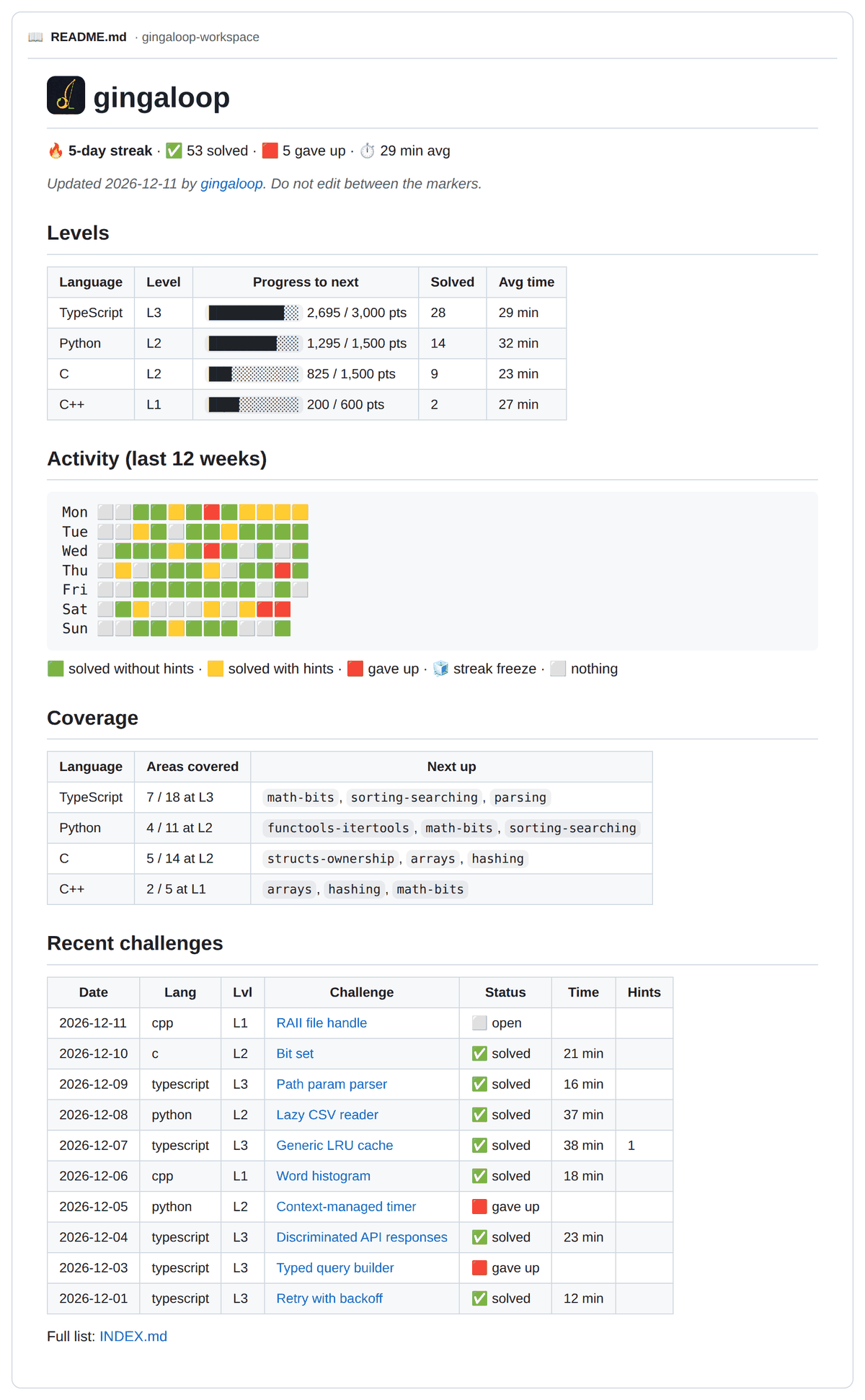
The workspace README after ten weeks of practice (sample data from node scripts/sample-dashboard.mjs).
Make it a git repo to keep a history of your practice: .gitignore and .gitattributes are
already set up. ginga never commits on its own (unless you turn on sync.auto), but ginga commit does it in one step with a
message built from your progress (no AI involved, so it's free), and ginga push publishes it:
$ ginga commit --push
  practice(2026-10-03): solve 1, new 1

  - new(python): URL slugs for blog titles · L1 · strings
  - solve(python): URL slugs for blog titles · L1 · 30 min · 0 hints · +100 pts

Commit with this message? [Y]es / [e]dit / [n]o [y]
It uses your normal git setup (signing, hooks), sets the upstream on the first push, and with
--yes works without a terminal. Its README.md is a progress
dashboard (streak, levels with progress bars, a 12-week activity grid with 🟩 clean solves, 🟨 solves
with hints and 🟥 give-ups, coverage and recent
challenges), rewritten after every daily, new, hint, done, giveup and rank. Only the
part between <!-- gingaloop:start --> and <!-- gingaloop:end --> is generated; write whatever
you like around it.
If you push the workspace to a public remote, remember that each README is also its challenge's unlock key, so anyone can read the solutions. A private repo avoids that.
The workspace repo is all the state there is, so a second machine (a laptop for a trip, say) only
needs a clone of it. ginga sync keeps the two in step: it commits what's on this machine, pulls
the other's work with a rebase and pushes. progress.jsonl (and LESSONS.md and IMPROVEMENTS.md)
merge line by line, the log is read back in time order, and the dashboard and INDEX.md are rebuilt
rather than merged. Only when both machines changed the same file you wrote (a NOTES.md, say) does
it stop: nothing is merged and it names the file to settle by hand.
git clone <your workspace repo> ~/gingaloop
ginga config set sync.auto true     # once: it's in gingaloop.json, so it travels with the repo
With sync.auto, daily syncs before it draws and after it generates. While you're away, the
scheduled daily at home keeps making challenges and pushing them; on the laptop, ginga sync (or
ginga daily, which then finds today's made) brings them in. If the machine at home is off,
ginga daily on the laptop makes the day's challenge itself (it needs Claude Code there), and the
home machine finds it on its next run instead of making another. If both run daily in the same
moment, both challenges are kept and daily tells you which to ginga discard.
The scheduled daily never waits for a person: git runs without prompts and with a time limit, and
a sync that fails leaves the challenge on that machine with a notification. So the timer's commits
must not need you. If you sign commits with a passphrase, either turn signing off for the workspace
(git -C ~/gingaloop config commit.gpgsign false) or keep your key unlocked in the agent, and use
an ssh key the agent can hand out without asking. Install the schedule on one machine only.
Every challenge, daily or on demand, lands in challenges/<date>-<lang>-<slug>/:
challenges/2026-10-02-c-ring-buffer/
  README.md        the problem, examples, constraints  (also the decryption key, see below)
  challenge.json   level, type, topics, test command, source (daily | manual)
  starter/         ← you work here
  tests/           the test suite (visible; read it!)
  locked.bin       encrypted: solution/, solution/EXPLANATION.md, bugs/, hints (+ original/)
  NOTES.md         your notes; done/giveup fill in the time, hints and result
After ginga done or ginga giveup, locked.bin is replaced by solution/ (with EXPLANATION.md:
the approach, a traced example, complexity, alternatives, the common bugs, language idioms and two
"level up" follow-ups), bugs/ (the typical mistakes the tests catch) and hints.md. Types that hand
you code (fix-the-bug, refactor, extend, debug-from-symptom, optimize) also get original/, the code
as you received it, so ginga review judges your fix or change against it instead of reviewing the
result as if you had written it from scratch.
| Type | From | You… | Graded by |
|---|---|---|---|
| implement | L1 | write the code from the spec | the tests |
| fix-the-bug | L1 | fix a buggy implementation | the tests |
| refactor | L1 | make poor code meet a new requirement | the tests |
| extend | L1 | add a feature to a working module | the tests |
| write-the-tests | L1 | write the test suite for a visible, correct subject/, one file per item of "What to test" |
your tests must pass on it and fail on every hidden buggy version (ginga test shows "caught 3/4"); a version must be caught by the file of the item it breaks, or it counts as caught by accident (⚠, not a clean solve, the topic comes back as a review) |
| trace | L1 | read program/ and write its exact output in starter/answer.txt |
the real output (the tests never print it) |
| port | L2 | rewrite source/, a solution in another language from your rotation |
the tests, in the target language |
| debug-from-symptom | L3 | fix a bug when the README shows only the symptom | the tests (and the symptom is reproduced for real) |
| optimize | L3 | make correct-but-slow code meet a time budget | correctness + a budget test, sized so a slower complexity class can't pass even on a fast machine |
port needs a source you can read at the challenge's difficulty: another rotation language at
L2 or higher and at most one level below the challenge. If none qualifies at your level, the port
is generated one level lower (never more); with an explicit --level, it isn't lowered. The source comes from a different language family when possible
(Python ↔ JS/TS ↔ C/C++), so the real porting traps show up: floor vs truncating division, bytes vs
characters, mutability, map ordering. SQL and React are never ported.
The daily mix is weighted so implement stays at least half of your challenges at every level;
ginga new <lang> --type trace picks one explicitly. Extra folders (subject/, program/,
source/) are visible, and ginga open opens them with the starter.
Each language has its own level, from 1 to 10. The rules are modeled on Codewars ranks and Duolingo streak freezes:
Points. ginga done runs the tests itself, and only then does the solve earn points:
| Your solve | Points |
|---|---|
| at your current level | 100 |
| 1 level below | 30 |
| 2+ levels below | 5 |
| after giving up | 0 |
Hints scale that: 0 hints 100%, 1 → 85%, 2 → 70%, 3 → 50%.
Levels cost more and more points (cumulative):
| L2 | L3 | L4 | L5 | L6 | L7 | L8 | L9 | L10 |
|---|---|---|---|---|---|---|---|---|
| 600 | 1,500 | 3,000 | 5,500 | 9,500 | 16,000 | 26,000 | 42,000 | 68,000 |
That's 6 clean solves for L2, 9 more for L3, then 15, 25, 40… L10 is a multi-year goal.
Points are necessary but not enough. To unlock the next level you also need:
- Breadth: a clean solve in every area unlocked at your current level (
ginga coverageshows them), so you can't skip a topic; - Consistency: your last 3 solves at your level are clean (at most one hint, not after giving up).
When the points and both gates are met, your next challenge in that language is a 🥋 promotion: a slightly harder problem at your level that combines 2–3 areas you've already practiced (the least recently practiced first). Solve it cleanly to move up. If you give up or need 2+ hints, nothing is lost: regular challenges continue, and another promotion comes after 3 days.
"Clean" is deliberately strict: points measure effort, the gates measure mastery. ginga rank shows
what's still missing (missing areas: hashing · clean streak 2/3). Levels you reached before these
gates existed are kept.
- The daily job always generates at your level.
ginga new <lang> --level Npicks any level up to yours, never above. - Solving easier challenges still counts a little, but farming them is slow: at 5 points, two or more levels below is 20× slower than playing at your level.
- Reviews (a new problem on the same idea) come back 3, 7 and 21 days later, spaced the way memory research recommends, for every challenge you gave up on or struggled with (2+ hints, or a time far above your own pace, see below). A review is an extra, optional challenge next to the daily one, so the rotation never stalls, and there's never more than one open: the next waits until you finish it. Struggling with a review (or giving it up) adds one more step to the same cycle, 14 days after the last (3/7/21 → 3/7/21/35); a review never starts a cycle of its own. If the machine was off, reviews come on the first daily after.
- Levels are recomputed from
progress.jsonl, so tuninglevelingingingaloop.jsonre-scores your history.
Pace. Claude estimates each challenge's time, but estimates are rarely right for you. Your
pace is the median of your time ÷ the estimate over your recent clean solves (per language once you
have 3 there), so expected = estimate × pace. ginga done shows it:
✔ Solved Hop around a ring.  +100 points
  expected   31 min   (estimate 20 × your pace 1.54)
  took       42 min   +11 min (+35%)
  0 ───────────┆──────┆─●─╎─────── 2×   ┆ on pace ±25%  ╎ struggle +50%
  → slower than usual (no review)
Within ±25% (pace.tolerance) is on pace; more than 50% over (pace.struggle) is a struggle and
brings the topic back as a review. Time alone counts only after 5 clean timed solves, when the
pace means something; hints and give-ups count from day one. ginga rank shows your pace per
language and the dashboard shows expected vs. actual for each recent challenge.
Streak. Count of consecutive days with at least one solve. Every 7 solve days earns a ❄️ freeze (hold up to 2); a missed day uses one automatically instead of breaking the streak.
There are deliberately no leaderboards: research on gamified learning found that competition and point-chasing distract from learning.
Every challenge targets a practice area. There are generic ones (strings, hashing, parsing, trees,
graphs, dynamic programming, concurrency…, in prompts/areas.json) plus areas
specific to each language (C pointers and memory, Node streams, TypeScript generics, C++ move
semantics…, in each profile). Each area has a minimum level, so graphs don't show up at L1, and
every level from 1 to 10 opens new ones, up to storage engines, runtimes and query engines at the
top. SQL and React keep only the generic areas that make sense for them (genericAreas in the
profile), so the breadth gate never asks a query for a linked list.
The generator picks the least-covered area unlocked at your level (ties at random), so practice spreads out instead of circling a few favorite topics. Reviews keep the area of the challenge you gave up on.
$ ginga coverage c
C  L1  ████░░░░░░░░  2/6 unlocked areas covered
  ★ c-strings            ■ 1
  ★ pointers-arrays      ■ 1
    strings              □ not yet
    …
  Unlocks at L2 (11): structs-ownership, dynamic-memory, …
  Later levels: 38 more areas (ginga coverage --all)
Choose an area yourself with ginga new c --area dynamic-memory.
The solution bundle is encrypted with AES-256-GCM using SHA-256 of the challenge's README.md as
the key. There are no keys to store or carry between machines, and editing the README breaks the lock
(restore it with git checkout and run the command again).
This is friction, not security. Anyone can derive the key from the README. It exists so you don't spoil the solution by accident, or "just glance" at it. It won't stop you if you decide to cheat.
To keep the key from breaking by accident:
- each challenge README is read-only once published (your editor will warn before writing);
- READMEs are normalized at publish (LF, no trailing spaces, one final newline), and unlocking tries that normal form too, so editors that strip whitespace or switch line endings don't matter;
- the workspace's
.gitattributesmarks READMEs as-text, so git never rewrites them; - the list of bug variants lives inside the lock too, so
challenge.jsondoesn't spoil the common mistakes.
All generated code runs in a container, never on your machine. That includes your ginga test runs,
validation, and every experiment Claude runs while writing a challenge. Each run:
- works on a throwaway copy of the challenge folder (the original is never mounted);
- has no network, runs as your uid with all capabilities dropped,
no-new-privileges, a read-only root filesystem and a small/tmp; - is limited to 1 GB of memory, 2 CPUs and 256 processes, with a timeout (configurable in
gingaloop.json).
While generating, Claude may only write files in its staging directory, and its only shell command
is ginga sandbox run --jail …. With --jail, every folder or profile it names must resolve (after
symlinks) inside that staging directory, and no option can be given twice, so the command can't be
widened. Profiles written by Claude can't add docker run flags; only built-in profiles may, from
a short whitelist.
Membership in the docker group is root-equivalent on the host. For stronger isolation use rootless
Docker or Podman ("sandbox": { "engine": "podman" }; gingaloop adds --userns=keep-id and an
SELinux :z label for it).
Built-in profiles: python, javascript, typescript, nodejs, c, cpp, sql (SQLite) and react,
each with a hand-validated reference challenge in examples/.
Each language practices basics (standard library only) by default. Some also have an ecosystem stack with the libraries you'd use at work, pinned to exact versions:
| Language | Ecosystem stack |
|---|---|
| python | numpy 2.1, pandas 2.2, pytest 8.3 |
| javascript / typescript | vitest 2.1, zod 3.23 |
| nodejs | vitest 2.1, fastify 5.2, zod 3.23 (HTTP tested in memory with inject) |
| cpp | GoogleTest 1.16 + CMake 3.31 |
Choose per language with ginga stack python basics|mixed|ecosystem (init asks too):
- basics (default) is a guarantee, not a preference: basics challenges run in an image where the
libraries don't exist, so
import pandasfails. - mixed gives some ecosystem challenges. The share depends on the domain: about half for data-heavy domains like quant or analytics, less for systems work.
- ecosystem always uses the libraries.
Your level stays one per language; rank and the dashboard show how many solves were basics vs
ecosystem. The ecosystem image is built only the first time you need it (ginga doctor --pull).
Any other language works too. The first time you use one (ginga new elixir, or
ginga lang add elixir), Claude writes a profile for it (an official Docker image, test command and
conventions) plus a reference challenge. The profile is kept only if that challenge validates. It
lives in your workspace's profiles/.
C and C++ challenges come with a compile_flags.txt that mirrors the sandbox flags
(-std=c17 / -std=c++20, -Istarter), so clangd and debuggers that honor it (such as
autodap.nvim) see the same code the tests do. ginga open
adds it to older challenges, and never overwrites one you edited. It also defines GINGA_SCRATCH,
so you can keep a personal main in the starter for quick runs without breaking ginga test:
#ifdef GINGA_SCRATCH   // defined for your editor/debugger only, never in the sandbox
int main() { /* try things here */ }
#endif
A profile is a small JSON file. See profiles/python.json. Good profiles
are very welcome as pull requests; see CONTRIBUTING.md.
Pick the industries you want your challenges framed in: ginga domains add quant fintech
(general, no industry framing, is the default). The domain shapes the story, the realistic data
and the domain's own rules (money in cents for fintech, look-ahead bias for quant, fixed memory for
embedded), while the area still decides the core skill. Your domains rotate without repeats, and
general still shows up about 1 in 4 times so fundamentals stay in the mix.
40 domains in 7 groups (ginga domains list):
- Business & web: fintech, ecommerce, backend, frontend, healthcare, logistics, edtech, govtech, mobile, adtech, accounting, travel, insurance
- Data & AI: data-eng, ml-tooling, analytics, search
- Finance (quantitative): quant
- Systems & infrastructure: devops, storage, distributed, networking, security, devtools, os, realtime
- Low level & real time: embedded, gamedev, media, trading-sys, robotics, telecom, gis
- Science & other: scientific, bioinformatics, web3, energy, manufacturing, i18n
- general (default)
Nothing reaches your workspace unless it passes the validator:
- the reference solution passes the tests;
- your starter fails them;
- every bug variant in
bugs/fails, on the test meant to catch it. There are 3–5: realistic slips in the reference, plus at least one alternative approach a learner would plausibly take that is subtly wrong (a regex instead of a loop, a different data structure); - the README, hints and explanation have all their sections;
- it isn't a repeat: the slug and title are compared with every past challenge in that language (exact and near-exact matches, ignoring plurals, word order and filler words). The generator also sees that full list up front. Review challenges are exempt, since they revisit a topic on purpose.
Beyond what the validator can check, the generator designs each test suite from the contract:
- it covers every input class the spec allows;
- it tests each rule where no other rule could produce the same output;
- it asserts exact error messages;
- it adds a golden table: 30+ inputs from a fixed seed, with outputs computed by the reference.
These rules come from real misses, where the tests passed but the solution was still wrong.
If validation fails, Claude gets the validator output and one retry. After that, the attempt is
kept in .staging/_failed/ for inspection.
Generated challenges are validated (the reference passes, the starter and every bug variant fail),
but a validator can't know what the tests forgot. ginga review sometimes finds that the
challenge was wrong, not you: a reference that loses precision on a value the README allows, a
promise no test checks, an ambiguous contract. ginga learn closes that loop:
$ ginga review          # Claude reviews your solution against the reference
$ ginga learn           # …and turns what it found about the challenge into rules

 1. When README.md allows integers of any size, the reference must reduce before adding (JS
    numbers lose precision above 2^53) and a test must use a value ≥ 2^53.
    [all languages → LESSONS.md]
    why: the reference computed at + jumps[at] before wrapping and returned [1] for [0, 2**60, 0].

Save which? [a]ll, [n]one, or numbers like 1,3 [a]
LESSONS.mdgoes into every later generation prompt: the "all languages" rules plus that language's own (newest 30 of each). It's plain Markdown in your workspace: edit or delete lines freely, andginga commitversions it with everything else.IMPROVEMENTS.mdcollects problems only a change to gingaloop itself would prevent, such as a check the validator should make.- Advice about your code stays in the review; only the generator's mistakes become lessons.
Your lessons improve your challenges right away. To fix it for everyone, a rule has to go
into gingaloop itself: ginga learn offers to open a pre-filled GitHub issue for each general rule
(--report does it without asking). You read it before submitting, and it holds the rule and a short
summary, never your code. See CONTRIBUTING.
| Command | |
|---|---|
ginga init [dir] |
create a workspace (languages, random/ordered, time) |
ginga new <lang> [--level N] [--area ID] [--type T] [--stack S] [--domain D] |
generate a challenge now; every option is optional and capped by your level |
ginga daily [--force] |
today's challenges: your anchors (or one from the rotation) and any extras (what the timer runs) |
ginga open [id] |
open README + starter files in your editor (editor in config, else $VISUAL/$EDITOR, else vi) |
ginga test [id] [--watch] |
run the tests against your starter; --watch reruns them on every save |
ginga hint [id] |
next hint (recorded); says what it costs before revealing it |
ginga pause [id] / ginga resume [id] |
pause the timer for a break, start it again (ginga open on a paused challenge resumes it too) |
ginga timer [id] |
the timer: running or paused, active minutes, pauses so far (ginga list marks paused ones ⏸) |
ginga done [id] [--minutes N] |
verify, record the solve, unlock the solution; suggests the timer's active minutes since your first ginga open, minus pauses (over 4 h it only shows them, since unpaused breaks are likely); fills the empty "Time spent", "Hints used" and "Result" lines of NOTES.md |
ginga giveup [id] [--reason R] |
record a give-up, unlock the solution, fill in NOTES.md; asks what stopped you, which goes to NOTES.md and steers the topic's review challenges |
ginga discard [id] [--reason R] |
drop a broken, duplicate or unwanted challenge: no penalty, no review, no reveal; its area, type and daily slot come back (the folder stays, marked ⬛) |
ginga review [id] |
Claude reviews your solution against the reference (after unlock), running the tests and its own edge-case probes in the sandbox |
ginga learn [id] [--report] |
turn the review's findings about the challenge itself (wrong reference, untested promise…) into rules every future generation follows; --report opens a pre-filled issue to fix it for everyone |
ginga rank / ginga list |
levels (with basics/ecosystem split), streak, weak topics, Claude cost / all challenges, in creation order, with where each came from (daily, manual or a review of which topic); --json for scripts |
ginga coverage [lang…] [--all] |
practice areas per language and how often you've had each, plus what unlocks next (--all: every area; --json too) |
ginga rotation [list|set|add|remove|mode|anchor|extra] |
the daily's languages, order, anchors and extras, e.g. ginga rotation add typescript cpp, ginga rotation mode ordered, ginga rotation anchor add python, ginga rotation extra 0.3 |
ginga commit [--yes] [--push] |
commit the workspace with a structured message built from your progress (plain git, no Claude tokens) |
ginga push |
push the workspace, setting the upstream on the first push (plain git, no Claude tokens) |
ginga sync |
commit, pull your other machines' work, push (see Several machines) |
ginga stack [<lang> basics|mixed|ecosystem] |
standard library only, or also the language's pinned libraries |
ginga domains [list|set|add|remove] |
industries your challenges are framed in (general by default); ginga domains shows yours, list all 40 |
ginga lang list / ginga lang add <name> |
profiles |
ginga schedule install|remove|status |
systemd user timer |
ginga doctor [--pull] |
check setup, pre-pull images |
ginga doctor --prune [--all] |
remove images gingaloop built that no profile uses anymore (--all: every gingaloop image; official images are never touched) |
ginga completion bash|zsh |
shell completion: source <(ginga completion zsh) in your shell rc |
ginga config [show|get|set|unset] |
view or change gingaloop.json with type checks, e.g. ginga config set claude.model opus; show lists what you changed (--all every setting, --json for scripts) |
ginga validate [dir] [--examples] |
validate a challenge or the built-in examples |
Every command has its own help: ginga <command> --help or ginga help <command>. Output is in
color on a terminal and plain when piped or logged; NO_COLOR=1 turns color off, FORCE_COLOR=1 on.
[id] can be a prefix. Without it, a command run inside a challenge's folder uses that challenge;
elsewhere it uses your newest open challenge (review: your newest unlocked one). Use --workspace DIR (or
GINGALOOP_WORKSPACE) to point at a workspace explicitly.
{
  "rotation": ["python", "typescript", "c", "rust"],
  "rotationMode": "random",
  "daily": { "anchors": [], "extraChance": 0, "extraMax": 1 },
  "stack": { "python": "mixed" },
  "domains": ["general"],
  "editor": null,
  "leveling": {
    "thresholds": [600, 1500, 3000, 5500, 9500, 16000, 26000, 42000, 68000],
    "basePoints": 100,
    "belowShare": [0.3, 0.05],
    "hintMultiplier": [1, 0.85, 0.7, 0.5],
    "cleanStreak": 3,
    "promotion": true,
    "promotionRetryDays": 3
  },
  "reviewAfterDays": [3, 7, 21],
  "reviewExtendDays": 14,
  "pace": { "tolerance": 0.25, "struggle": 0.5 },
  "schedule": { "time": "08:00" },
  "sync": { "auto": false },
  "claude": { "command": "claude", "model": null, "timeoutMinutes": 20, "retries": 1, "maxBudgetUsd": null },
  "sandbox": { "engine": "docker", "memory": "1g", "cpus": "2", "pidsLimit": 256, "timeoutSeconds": 120 }
}
daily holds the anchors and extras (set them with ginga rotation anchor and ginga rotation extra). sync.auto makes daily run ginga sync before and after it generates. editor is what ginga open runs (null → $VISUAL, $EDITOR, then vi). claude.maxBudgetUsd
caps each Claude call (a generation makes one, plus one per retry); null means no cap.
Missing keys use their defaults, and ginga only writes the values you changed (plus your rotation, domains, stacks and schedule), so a default improved in a new release reaches you automatically. Workspaces from 0.3 or earlier are upgraded once, on their first command, with a one-line notice.
Only five commands call Claude, and they use your Claude plan or API key like any other Claude Code session:
| Uses Claude tokens | When |
|---|---|
ginga daily, ginga new |
one session per generated challenge, plus at most one retry if validation fails |
ginga lang add |
once per new language (also when a challenge first needs that language) |
ginga review |
only when you ask for a review |
ginga learn |
only when you ask; one short call with no tools (the review and README are in the prompt) |
Everything else is local and free: open, test, hint, done, giveup, rank, list,
coverage, rotation, commit, push, doctor, schedule, validate and init. In
particular, ginga commit builds its message from your progress log with plain code, and ginga push is just git push.
Each generation records what it cost (at API list price, as Claude Code reports it), and ginga rank
shows the total and the last 30 days. On a Pro or Max plan that's a measure of usage, not a bill. A
generation that fails says how much it spent before giving up. Set claude.maxBudgetUsd to cap each
call.
- Any AI harness. Today gingaloop drives Claude Code. The goal is a small adapter layer so other
agent CLIs and local models can generate challenges too. Each adapter must keep the same
guarantee: during generation the agent can only write to its staging directory and run code
through
ginga sandbox run --jail. - macOS and Windows. Linux is the only tested platform today; the sandbox and the scheduler (systemd) are the parts to port, likely with Docker Desktop on macOS and WSL 2 on Windows.
- Lessons become checks. Lessons from
ginga learnreports that can be verified mechanically (e.g. "the reference must be exact at the extremes README.md allows") move into the validator, so a bad challenge is rejected before anyone sees it, not just discouraged by the prompt. - More built-in languages. Rust, Go and others work today through
ginga lang add; curated profiles with hand-checked examples are welcome (see CONTRIBUTING).
MIT