chinese_font_library 意在优化中文字体的跨平台渲染,目前支持:
- 多字重的渲染
- 动态加载字体
本项目由 庞征博引 赞助:把复杂主题拆成一篇篇 5–10 分钟的阅读,边读边问,按自己的节奏慢慢学懂。
| chinese_font_library | Flutter | Dart |
|---|---|---|
| 1.3.0 | >=3.41.0 |
>=3.11.0 |
| 1.2.0 | >=3.22.0 |
>=2.19.0 |
Flutter 3.41 起,框架会自动把 TextStyle.fontWeight 映射到可变字体的 wght 轴,
本包也随之改用 FontWeight.value,因此 FontWeight(550) 这类非整百字重不再被向下取整。
dependencies:
chinese_font_library: ^1.3.0多字重的渲染
Flutter 使用的系统默认字体多为西文字体,因此不同平台下的中文字体通常渲染为 normal 字重或 bold 字重,且 bold 字重为计算后得到的字重,并非原生 bold 字重,严重影响观感。
解决方案为使用 .useSystemChineseFont() 修改已有的 textStyle:
Text(
  '你好世界 hello world',
  style: const TextStyle(fontWeight: FontWeight.w100).useSystemChineseFont(),
)
或者使用 .useSystemChineseFont() 修改已有的 textTheme:
return MaterialApp(
  theme: ThemeData(
    textTheme: yourCustomTextTheme.useSystemChineseFont(Brightness.light),
  ),
);
也可以使用 .useSystemChineseFont() 修改已有的 themeData:
return MaterialApp(
  theme: yourCustomThemeData.useSystemChineseFont(Brightness.light),
);
动态加载字体
如果您不满足于系统内置的中文字体,想使用自己精选的中文字体,而中文字体通常体积较大,放在安装包中并非最佳选择。
解决方案为通过网络动态加载字体,仅需下载一次:
DynamicFont.url(
  fontFamily: 'CustomFontFromWeb',
  url:
      'https://raw.githubusercontent.com/LastMonopoly/chinese_font_library/master/example/assets/SmileySans-Oblique.ttf',
).load();
也支持从 asset 与本地文件加载:
DynamicFont.asset(fontFamily: 'CustomFont', key: 'assets/MyFont.ttf').load();
DynamicFont.file(fontFamily: 'CustomFont', filepath: '/path/to/MyFont.ttf').load();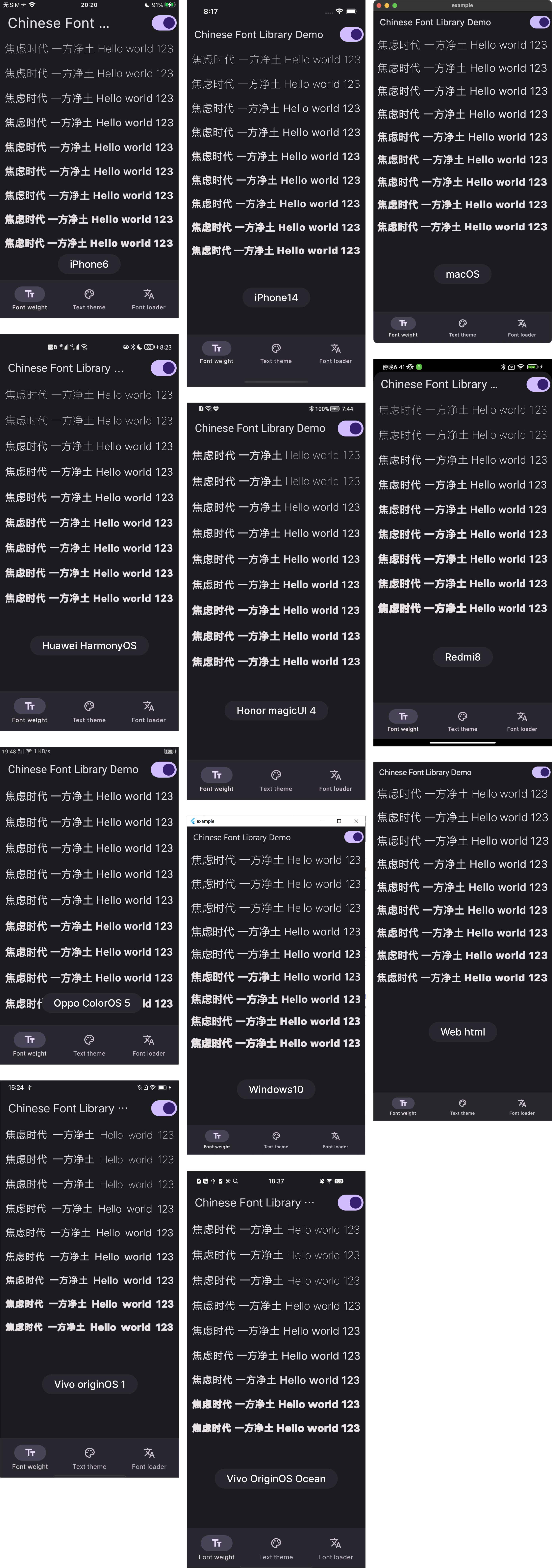
如有任何意见或建议,请在 Github 上联系我。(❔ 表示尚未在真机上验证)
| iOS | 华为 鸿蒙 | 小米 miui | macOS | Windows | Web html | 荣耀 | Vivo | Oppo | Linux |
|---|---|---|---|---|---|---|---|---|---|
| ✔️ | ✔️ | ✔️ | ✔️ | ✔️ | ✔️ | ✔️ | ✔️ | ✔️ | ❔ |