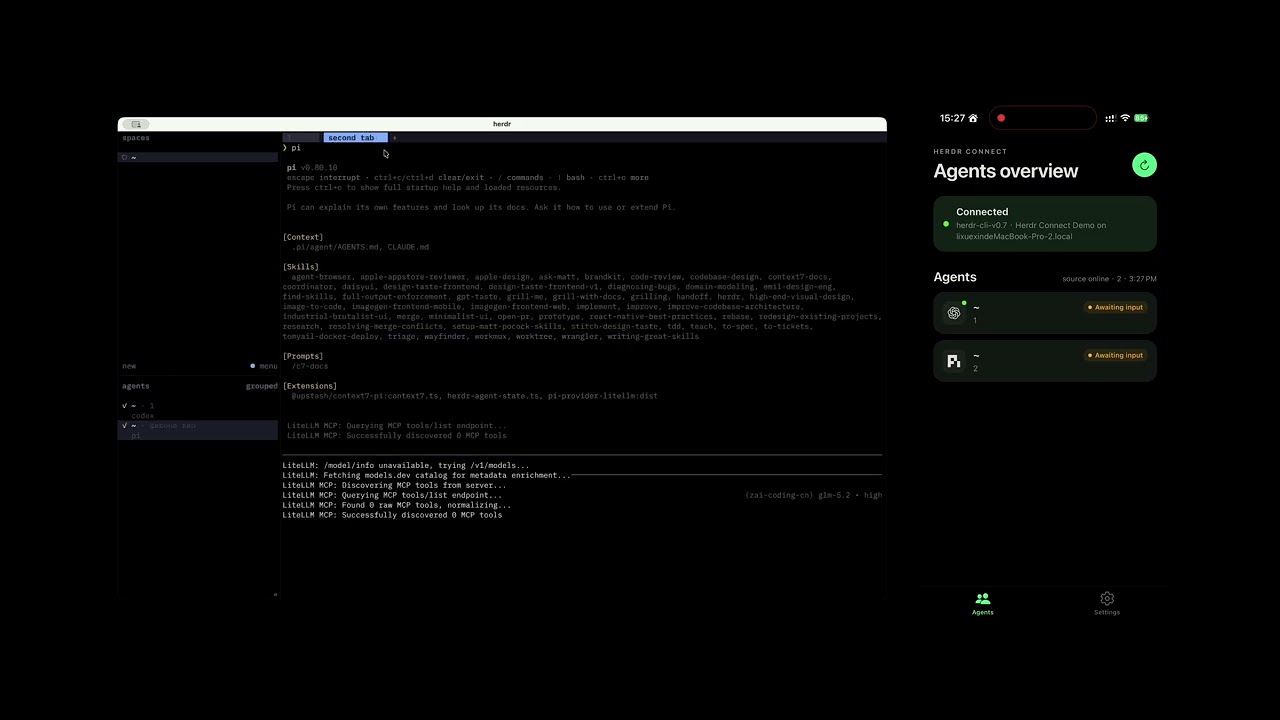
Herdr Connect is a local-first companion for Herdr. It lets an iPhone discover a nearby Herdr daemon, pair with it, and control Agents on the same local network without sending Agent state through a cloud service.


The current product scope is intentionally LAN-only: the daemon and phone must be on the same reachable network, and the data path stays inside that network. Remote relay access is a future milestone, not part of the current release.
You need a computer running Herdr, an iPhone, and both devices on the same LAN (physical Wi-Fi or a VPN that makes them mutually reachable). Android is not currently published.
-
Confirm that Herdr is installed and has at least one Agent:
herdr agent list
-
Install the daemon. The installer fetches the latest release automatically. The downloaded daemon does not require Go, Node.js, pnpm, Expo, or Xcode.
On macOS or Linux:
curl -fsSL https://raw.githubusercontent.com/Tomyail/herdr-connect/main/install.sh | shOn Windows, download and extract the matching zip from the newest entry on the GitHub Releases page (all releases are currently tagged as preview/prerelease, so GitHub's "latest release" shortcut doesn't apply).
-
Check and start the daemon. The macOS/Linux service continues in the background; Windows users keep the foreground terminal open while using the app.
On macOS or Linux:
~/.local/bin/herdr-connect doctor
~/.local/bin/herdr-connect service install
~/.local/bin/herdr-connect service status
On Windows PowerShell, run these commands in the extracted folder:
.\herdr-connect.exe doctor
.\herdr-connect.exe --source herdr demo-lan
-
On your iPhone, join the public Herdr Connect TestFlight beta, install the app, and allow Local Network access when prompted.
-
Pair the phone with the daemon:
herdr-connect pair
The command prints a one-time QR code. In the app, open Settings → Pair new device and scan it. The phone pins the daemon certificate fingerprint, exchanges the one-time secret for a per-device bearer token, and stores that credential locally.
-
Return to the Agents tab. The app should show your Agents. Tap an Agent to view recent output, switch focus, send text, interrupt a running turn, or receive completion notifications while the app is in the foreground.
If discovery does not succeed, confirm that both devices are on the same reachable LAN, temporarily disable VPNs that block local multicast, and check firewall or guest-network isolation settings. See the daemon guide and TestFlight troubleshooting guide for details.
For all commands, diagnostics output, exit codes, and examples, see the CLI guide.
Note
LAN-only is the current product boundary: Herdr Connect is designed for devices you control on a local network, with no cloud relay in the data path. The LAN transport is HTTPS with a self-signed ECDSA P-256 certificate pinned by SHA-256 fingerprint, one-time QR pairing, per-device bearer tokens, device revocation, and rate limiting. See LAN TLS and pairing for the full trust model and known boundaries (single owner, bearer-token auth, no message-layer E2EE yet).
Herdr Connect is a local-first LAN control surface for Herdr. The current release focuses on same-LAN iOS control with pairing and transport security; remote relay access and message-layer E2EE remain future milestones.
| Area | Status |
|---|---|
| Bonjour/mDNS daemon advertisement | Implemented |
| iOS discovery on a physical device | Public TestFlight beta available |
| Pairing and LAN authentication | QR pairing, pinned TLS, per-device bearer tokens, revocation |
| Agent list, recent output, focus, text input, interrupt | Authenticated LAN API |
| Local completion signal | Foreground sound / haptic / local notification |
| API compatibility | Daemon/app version negotiation with upgrade prompts |
| Android app / APK | Not published |
| Message-layer E2EE and relay remote access | Future milestone |
The current public scope is LAN-only control:
- advertise
_herdr-connect._tcpfrom the Go daemon; - secure the LAN transport with TLS fingerprint pinning and QR pairing;
- manage paired devices locally (
herdr-connect devices list/revoke); - discover and pair from an iPhone on the same reachable LAN;
- show Agent state, recent history, focus controls, text input, and interrupt;
- surface completion cues in the foreground (in-app badges, sound, haptic, local notification);
- provide diagnostics for local-network permission, VPN, multicast, firewall, client isolation, and version mismatch failures.
Discovery still proves reachability only; trust is established by QR pairing and certificate pinning. Official remote relay connectivity is deliberately outside this release scope.
Herdr Connect does not currently ship an official remote-connectivity product. If you already trust and operate a mesh VPN such as Tailscale, you can put the phone and daemon host on the same virtual LAN and use Herdr Connect over that network without changing Herdr Connect itself. The app only needs a reachable daemon address and the same TLS-pinning / pairing flow; it does not care whether the LAN is physical Wi-Fi or a VPN interface.
This is an unofficial deployment pattern, not a product guarantee. You are responsible for the VPN's access controls, routing, DNS/multicast behavior, and device security. The official remote roadmap is a relay-based design with message-layer E2EE.
| Audience | Start here |
|---|---|
| Install and pair | Try it in 5 minutes, daemon guide, TestFlight troubleshooting |
| CLI reference | CLI guide |
| LAN security model | LAN TLS and pairing |
| Architecture, domain, and contributor deep dives | OpenWiki |
| Historical pre-pairing demo | Archived LAN iOS demo guide |
OpenWiki is the living code-oriented wiki (architecture, adapters, projection, protocol notes, development setup, and testing). Prefer it over duplicating those details here.
Herdr CLI
    │ command-line arguments and JSON
    ▼
Herdr Connect daemon
    │ Bonjour / mDNS + HTTPS LAN API (pinned TLS, bearer-token auth)
    ▼
Expo / React Native mobile client
Herdr runs as a separate program and must be installed independently. Herdr Connect communicates with it through its CLI rather than embedding or linking Herdr source code.
For component responsibilities, data flow, and source maps, see the architecture overview.
Contributor setup, repository layout, common pnpm commands, and the full development workflow live in OpenWiki:
For users who only want the downloadable daemon and TestFlight app, follow Try it in 5 minutes instead.
Minimal path after cloning:
corepack enable
pnpm install --frozen-lockfile
pnpm demo:lan      # daemon on TCP 9808, advertises _herdr-connect._tcp
pnpm ios:mobile    # Expo development build on a physical iPhone
pnpm dev:mobile    # later sessions: Metro only
The mobile client needs native modules (Bonjour, pinned TLS fetch, camera pairing, notifications), so use an Expo development build rather than Expo Go. The historical LAN iOS demo guide is kept only as an archive of the pre-pairing procedure.
- Mature the LAN-only product: reliability, version compatibility, app-store readiness, and better owner ergonomics.
- Publish Android after the LAN model and native modules are ready on that platform.
- Add secure remote connectivity through a relay and message-layer E2EE as a later milestone.
Roadmap items may change as the project learns from real usage, but the current release commitment is local-first LAN control.
Do not report vulnerabilities, credentials, private prompts, Agent output, or sensitive paths in public issues. Follow the private reporting instructions in SECURITY.md.
The current LAN transport is encrypted and authenticated at the connection layer. Message-layer E2EE is not yet integrated; it belongs to the future relay milestone described by the Protocol v1 documents. For current guarantees and limits, start with LAN TLS and pairing.
Bug reports, reproducible LAN discovery or pairing failures, documentation fixes, and design feedback are welcome through GitHub Issues.
Before submitting code, open an issue to confirm that the change belongs to the current LAN-only scope or an accepted roadmap item. Please read CONTRIBUTING.md and the repository conventions in AGENTS.md.
Community policies: Code of Conduct, Security Policy, and Privacy Policy.
Herdr Connect is an independent companion project. It is not affiliated with or endorsed by the Herdr project. Herdr is installed separately and remains subject to its own license and project policies.
Licensed under the Apache License 2.0.