
Agent context as code.
usedeclares what the model can see, with optional labels for prompt sections.generatedefines the only LLM call site and optional output contract. Zero runtime dependencies. TypeScript-powered.
use scratch.summary max 2k as observations
generate({
    input: "Answer from observations"
}) -> {
    ok: boolean
    text
}



Documentation website: https://rongzhou.github.io/agentscript/
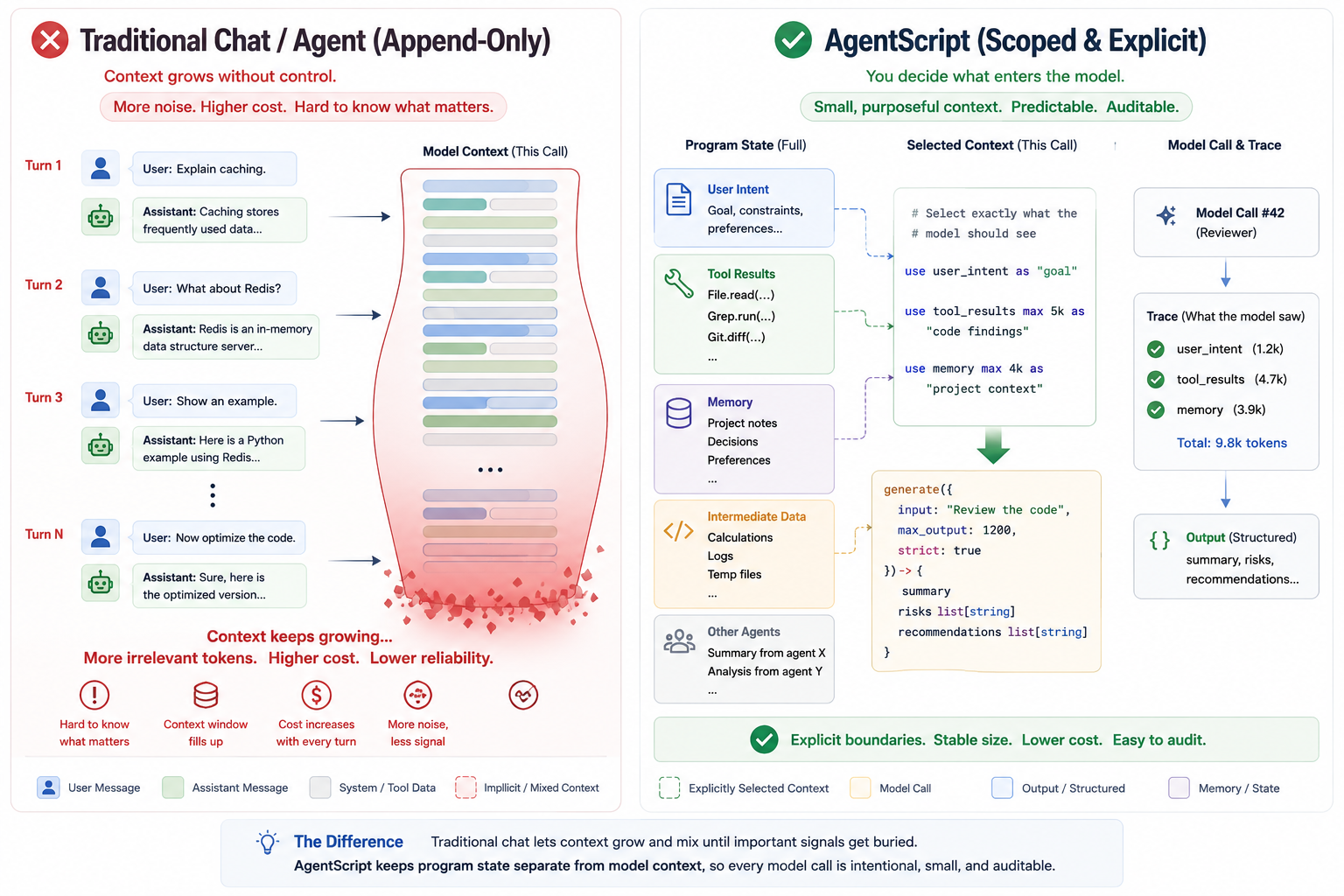
Traditional chat lets context grow and mix until important signals get buried.
AgentScript keeps program state separate from model context: only data selected
with use enters a generate call.
npm install -g @rong/agentscriptThen run the CLI:
agentscript --helpOr run without installing:
npx @rong/agentscript recipes/code-review.as --input '{"path":"src"}'# Real model call by default
agentscript recipes/summarize-file.as --input '{"path":"README.md"}'
# Mock override for deterministic local checks
agentscript recipes/summarize-file.as --input '{"path":"README.md"}' --mock
# Dry-run inspection without model calls
agentscript recipes/summarize-file.as --input '{"path":"README.md"}' --dry-run
# Audit trace
agentscript recipes/summarize-file.as --input '{"path":"README.md"}' --trace
# Optimize a target AgentScript program locally
agentscript examples/optimizer/optimizer.as examples/optimizer/triage.as --mock \
--request "Checkout is failing with 500 errors in production" \
--selection '{"examples/optimizer/triage.as#Triage.main[style]":"detailed"}' \
--write preview \
--trial-trace none
# Compile a structured AgentSpec into AgentScript source
agentscript architect --spec fixtures/architect/docs-assistant.spec.json /tmp/docs-assistant.as
# Ask the meta-agent to generate a source file from a requirement
agentscript architect "build a docs assistant with citations" /tmp/docs-assistant.as \
--model ollama://localhost:11434/qwen3.6The recipes/summarize-file.as recipe reads a local file, includes it in the LLM context, and returns a structured summary:
// recipes/summarize-file.as
import llm Qwen from "ollama://localhost:11434/qwen3.6"
import tool File from "file://workspace"

main agent FileSummarizer {
    model Qwen
    role "Technical Writer"
    description "Read one local file and produce a useful structured summary."

    main func(input { path: string }) {
        file = File.read({
            path: input.path
        })
        use input.path as "source path"
        use file.content max 8k as "file content"

        generate({
            input: "Summarize the file for a busy teammate",
            max_output: 1000
        }) -> {
            title
            summary
            key_points: list[string]
            action_items: list[string]
        }
    }
}
Expected output (with mock LLM):
{
  "value": {
    "title": "",
    "summary": "",
    "key_points": [],
    "action_items": []
  },
  "trace": [ ... ]
}
Trace makes the prompt inputs auditable:
use "source path"       value="README.md"
use "file content"      budget=8k clipped=true
generate                input="Summarize the file for a busy teammate"
schema                  title, summary, key_points, action_items
validation              ok
Use --mock when you want deterministic local output without real model, external tool, or memory calls. Built-in host:// tools still run in mock mode so workflows using host://optimizer or host://architect can validate their structure. Without --mock or --dry-run, AgentScript calls the configured real model.
The optional block after generate is an output schema, not ordinary object construction.
examples/contains minimal examples. Each file demonstrates one language feature or agent pattern.examples/optimizer/contains a mockable V6 optimizer workflow usinghost://optimizer.examples/meta/contains a meta-agent that generates AgentScript agents throughhost://architect.tutorials/contains longer walkthrough programs for learning multi-step agent patterns end to end.recipes/contains practical workflows you can copy and adapt, such as repo review, code review, changelog drafting, file summarization, document translation, API extraction, and research briefs.
Start with examples/structured-generate.as to learn the syntax, examples/arithmetic.as for operators, examples/plan-execute.as for parallel for, read tutorials/ for pattern walkthroughs, then use recipes/repo-review.as when you want a realistic, auditable repository workflow.
recipes/repo-review.as shows the core difference: tool results are not automatically prompt context. The recipe explicitly selects only the file tree, TODO/FIXME findings, package metadata, and CI configuration before asking for structured release-readiness output:
use "file tree"          budget=8k
use "todo findings"      budget=4k
use "package metadata"   budget=4k
use "ci configuration"   budget=4k
generate                 blockers, risks, quick_wins, next_steps
LLMs are stateless by nature. Each call is a fresh start. To give an agent continuity of thought, every input must be carefully assembled — what researchers and practitioners call context engineering.
After building agents with Python and TypeScript, the author kept running into the same problem: prompt context management. What data actually reaches the LLM? Where does one agent's context end and another's begin? How do you audit what the model saw?
AgentScript is not:
- a prompt template
- a YAML config format
- a general-purpose agent framework
It is a small language for one thing:
making LLM prompt context explicit, scoped, typed, traceable, and compilable.
It gives you two things that general-purpose languages don't: a first-class use keyword that declares which data enters the LLM prompt and what role it plays via as label, and a first-class generate expression that defines an LLM call with an optional output contract. Everything else — variables, functions, agents, imports, loops — exists to support this core workflow. Scopes enforce context boundaries naturally: what's used in one function stays there; child scopes inherit but never leak upward. Functions can also return their final top-level expression directly, which keeps typical LLM workflows concise.
graph LR
    A[".as source"] --> B["Parser"]
    B --> C["AST"]
    C --> D["Semantic Analyzer"]
    D --> E["Runtime"]
    E --> F["LLM Provider<br/>(OpenAI / Anthropic / Ollama)"]
    E --> G["Tools<br/>(Find / Grep / File / HTTP / ...)"]
    E --> H["Memory<br/>(JSONL / SQLite)"]
    E --> I["Trace Output"]
AgentScript is experimental.
Currently implemented:
- parser
- semantic checker
- mock runtime
- OpenAI / Anthropic / Ollama LLM adapters
- file and environment tools
- MCP stdio tool provider
- JSONL and SQLite memory backends
- trace output
host://optimizersource optimization toolchain- AgentSpec → AgentScript compiler through
host://architect agentscript architect --check/--spec/ natural-language CLI entry
Planned:
- stable IR
- richer diagnostics
- VS Code syntax support
- package publishing hardening
AgentScript doesn't hardcode agent patterns as keywords. You compose them from the same primitives:
| Pattern | Tutorial | What it demonstrates |
|---|---|---|
| ReAct | tutorials/react.as |
Reason → Act → Observe loop with explicit context |
| Plan-and-Execute | tutorials/plan-execute.as |
Generate a plan, execute independent steps, synthesize results |
| Multi-Agent | tutorials/multi-agent.as |
Independent agents with isolated context boundaries |
| Multi-Agent Review | tutorials/multi-agent-review.as |
Run specialist reviewers in parallel, then consolidate feedback |
| Reflection / Self-Improvement | tutorials/memory-reflection.as |
Query past lessons → generate → reflect → persist new lessons |
Every pattern is explicit — which data enters the prompt, which tools each agent can use, and which output contract each LLM call must satisfy when one is declared.
import llm Qwen from "ollama://localhost:11434/qwen3.6"
import tool Search from "mcp://tools/search"
import memory Lessons from "file://./.agentscript/lessons.jsonl"

main agent ResearchAgent {
    model Qwen
    role "Senior Researcher"
    description "Answer questions with search and structured reasoning."

    main func(input {
        question: string
    }) {
        use input.question as "user question"

        scratch = []
        use scratch.summary max 2k as observations

        done = false
        loop until done max 6 {
            thought = reason(input.question, scratch)
            obs = Search.search(thought.focus)
            scratch.add(obs)
            done = enough(input.question, scratch)
        }

        answer(input.question, scratch)
    }

    func answer(question, scratch) {
        use question as "user question"
        use scratch.summary max 2k as observations
        generate({
            input: "Answer using only the observations"
        }) -> {
            ok: boolean
            text
            error
        }
    }
}
useis explicit context — nothing enters the LLM prompt unlessused;as labelnames the context sectiongenerateis the only LLM call site — with a required input instruction and optional output contract- Final expression return keeps flows concise — a function returns its final top-level expression
- Scope is context boundary — functions, agents, and blocks isolate prompt visibility
- Tools, memory, and files are imported resources — with auditable access
- Trace is built in — every
generateanduseis recorded for debugging
AgentScript can call MCP tools through mcp:// tool imports. Current MCP support
is stdio-only and does not add runtime dependencies.
Configure servers in agentscript.mcp.json at the workspace root:
{
  "mcpServers": {
    "search": {
      "transport": "stdio",
      "command": "npx",
      "args": ["-y", "@example/mcp-server-search"],
      "env": {
        "SEARCH_API_KEY": "$SEARCH_API_KEY"
      }
    }
  }
}
Then import and call the server:
import tool Search from "mcp://search"

main agent Researcher {
    main func(input { query: string }) {
        result = Search.call({
            tool: "web-search",
            args: {
                query: input.query
            }
        })

        use result.text max 4k as "search results"
        generate({ input: "Answer from the selected search results" }) -> {
            answer
        }
    }
}
MCP results are ordinary data. They enter model context only when selected with
use.
AgentScript can also call explicitly allowed Node built-in modules and installed
npm packages through node: and npm: tool imports.
import tool Crypto from "node:crypto"

main agent NodeCryptoExample {
    main func(input { label: string }) {
        run_id = Crypto.randomUUID()
        digest = Crypto.hash("sha256", input.label, "hex")

        return {
            label: input.label,
            run_id: run_id,
            digest: digest
        }
    }
}
Enable the capability in agentscript.npm.json:
{
  "allow": {
    "node": ["crypto"],
    "npm": {}
  }
}
For a hands-on walkthrough, see TypeScript and Node Interop.
The package root exports stable runtime entry points and embedding types:
import { executeAgent, parse } from "@rong/agentscript";
import type { ExecuteOptions, RuntimeValue } from "@rong/agentscript";
import type { Program } from "@rong/agentscript/ast/types";
import type { AgentSpec } from "@rong/agentscript/architect/spec/types";| Python / TypeScript | AgentScript | |
|---|---|---|
| Context management | Implicit (string concatenation, array append) | Explicit (use declaration, optional as label) |
| LLM call site | Anywhere in the code | One generate expression |
| Context isolation | Manual discipline | Scope-inherited, auto-isolated |
| Trace / audit | External tooling needed | Built-in, per-call |
Python and TypeScript are excellent general-purpose tools, but they have no concept of "prompt context" as a language primitive. Every agent project reinvents the same patterns. AgentScript bakes them in.
agentscript recipes/code-review.as --input '{"path":"src"}'
agentscript recipes/code-review.as --input '{"path":"src"}' --mock
agentscript recipes/code-review.as --input '{"path":"src"}' --dry-run
agentscript recipes/code-review.as --input '{"path":"src"}' --trace
agentscript recipes/code-review.as --input '{"path":"src"}' --trace-file trace.json
agentscript recipes/code-review.as --check
agentscript examples/arithmetic.as --parse
agentscript recipes/code-review.as --quiet| Option | Description |
|---|---|
--input '<json>' |
JSON input for the entry function |
--input-file <path> |
Read input from a JSON file |
--agent <name> |
Select a specific entry agent |
--function <name> |
Select a specific entry function |
--check |
Parse + semantic analysis (no execution) |
--parse |
Parse and output AST as JSON |
--mock |
Use deterministic mock providers for model, external tool, and memory calls; built-in host:// tools still run |
--dry-run |
Build prompts and trace without model calls |
--concurrency <n> |
Set the runtime concurrency limit for parallel for |
--trace |
Print human-readable trace |
--trace-file <path> |
Write execution trace to a JSON file |
--verbose |
Print detailed trace |
--quiet |
Output only the final value |
Documentation website: https://rongzhou.github.io/agentscript/
- Context is explicit: ordinary variables, tool results, memory records, and trace events never enter prompts unless selected with
use. - Scope controls variable lifetime, context inheritance, and prompt exposure.
- LLM, tool, file, agent, and memory imports are runtime capabilities with explicit boundaries.
- Pattern names such as planner, executor, verifier, reflect, improve, and evolve are ordinary identifiers.
- Trace is for debugging and audit; it is not prompt context.
See CONTRIBUTING.md.
npm run typecheck
npm test
npm run build
Zero runtime dependencies. Built with TypeScript.
MIT