Nice and simple notifications for node-webkit apps

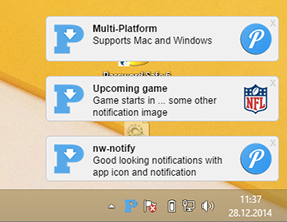
nw-notify displays notifications in the lower right corner. Notifications are stacked (most recent on the top) and slide down, once they expire. nw-notify is a child of Pullover, a destop client for the Pushover service. I was not satisfied with node-webkits native notifications on windows (just a bubble dialog) and other notification modules like node-notifier, node-webkit-desktop-notifications or nw-desktop-notifications did not work with node-webkit (node-notifier), had nasty bugs or just didn't look very nice. I made some design choices for nw-notify to prevent bugs the other implementations ran into:
- No slide in of notifications from the right side (prevent bugs with multiple screens)
- Short animation with as few steps as possible to keep it running smoothly
- Multi-Screen: Notifications are only shown on the first screen (this may change if someone makes a good pull-request)
- Windows and Mac supported (Linux not tested, but should work)
- AppIcons (optional, left of notification text) and images (optional, right of notification text)
- Close button (top right corner)
- Open URLs (optional)
- Callbacks for
show,click,close(by user),timeout(close after displayTime) andcloseByAPI
var nwNotify = require('nw-notify');
// Change config options
nwNotify.setConfig({
    appIcon: nwNotify.getAppPath() + 'images/icon.png',
    displayTime: 6000
});

// Send simple notification
nwNotify.notify('Some title', 'Some text');
// Notification with URL, click notification to open
nwNotify.notify('Open URL', 'Click to goto Wikipedia', 'http://wikipedia.org');
// Or some images within your app
nwNotify.notify('Open URL', 'Click to goto Wikipedia', 'http://wikipedia.org', nwNotify.getAppPath() + 'pathTo/image/from/nwAppRoot/folder.png');
// Do something when user clicks on notification
nwNotify.notify('Custom func','Action on click', null, null, function() {
    // Your code here
    console.log('User clicked notification')
});

// Change config options again
nwNotify.setConfig({
    appIcon: nwNotify.getAppPath() + 'images/otherIcon.png',
    defaultStyleText: {
        color: '#FF000',
        fontWeight: 'bold'
    }
});
// Send notification that uses the new options
nwNotify.notify('Notification', 'Using some other app icon');

// Supply object instead of parameters to notify function
var id = nwNotify.notify({
    title: 'Notification title',
    text: 'Some text',
    onClickFunc: function(event) { console.log('onCLick', event) },
    onShowFunc: function(event) { console.log('onShow', event) },
    onCloseFunc: function(event) { console.log('onClose', event) }
});

// Before terminating you should close all windows openend by nw-notify
nwNotify.closeAll();On startup nw-notify will determine the maximum amount of notifications that fit on the screen. This value will be stored in config.maxVisibleNotifications but cannot be greater than 7. This is to ensure that all animations go smoothly and nw-notify does not freeze your computer. However you can overwrite this value with setConfig(). If you do that you should use calcMaxVisibleNotification() to check if that many notifications fit onto the users screen.
Queueing: Once the limit of config.maxVisibleNotifications is reached, nw-notify will queue all new notifications internally. The order of notifiy()-calls will be preserved and once old notifications fade out, the queued notifications are shown.
Calling notify() will return an unique id for this particular notification. Each callback (onClickFunc, onShowFunc, onCloseFunc) will return an event object which contains the notification id, the event name(click, show, close, timout, closeByAPI) and a function to close the notification:
{
    event: 'click',
    id: 32,
    closeNotification: function() {}
}
Example
function handleClick(event) {
    console.log('User clicked notification ' + event.id + '. Closing it immediately.');
    event.closeNotification();
}

function handleClose(event) {
    console.log('Notification was closed because: ' + event.name);
}

nwNotify.notify({
    title: 'Notification title',
    text: 'Some text',
    onClickFunc: handleClick,
    onCloseFunc: handleClose
});Display new notification
Or supply an object to notify() like this:
notify({
    title: 'Title',
    text: 'Some text',
    image: 'path/to/image.png',
    url: 'http://google.de',
    onClickFunc: function() { alert('onCLick') },
    onShowFunc: function() { alert('onShow') },
    onCloseFunc: function() { alert('onClose')}
});
Change some config options. Can be run multiple times, also between notify()-calls to chnage nw-notifys behaviour.
Returns path to root of your node webkit app. Use it to provide paths to app icon or image files that are shipped with your app.
Clears the animation queue and closes all windows opened by nw-notify. Call this to clean up before quiting your app.
If you want to use your own notification.html you use this method. Use it like this: nwNotify.setTemplatePath(nwNotify.getAppPath() + 'path/to/notification.html');
Returns the maximum amount of notifications that fit onto the users screen.
The MIT License (MIT)

Copyright (c) 2014 Christoph Groß <gross@blubyte.de> (http://chris-labs.de)

Permission is hereby granted, free of charge, to any person obtaining a copy
of this software and associated documentation files (the "Software"), to deal
in the Software without restriction, including without limitation the rights
to use, copy, modify, merge, publish, distribute, sublicense, and/or sell
copies of the Software, and to permit persons to whom the Software is
furnished to do so, subject to the following conditions:

The above copyright notice and this permission notice shall be included in
all copies or substantial portions of the Software.

THE SOFTWARE IS PROVIDED "AS IS", WITHOUT WARRANTY OF ANY KIND, EXPRESS OR
IMPLIED, INCLUDING BUT NOT LIMITED TO THE WARRANTIES OF MERCHANTABILITY,
FITNESS FOR A PARTICULAR PURPOSE AND NONINFRINGEMENT. IN NO EVENT SHALL THE
AUTHORS OR COPYRIGHT HOLDERS BE LIABLE FOR ANY CLAIM, DAMAGES OR OTHER
LIABILITY, WHETHER IN AN ACTION OF CONTRACT, TORT OR OTHERWISE, ARISING FROM,
OUT OF OR IN CONNECTION WITH THE SOFTWARE OR THE USE OR OTHER DEALINGS IN
THE SOFTWARE.